假设已有Notion账号和一个域名。现在要绑定域名,仅需要做的是:
域名解析迁移到Cloudflare上
为什么要迁移呢?因为后面要用到Cloudflare的Workers服务,当然,如果你的域名解析服务原本就是Cloudflare,那可以跳过本小节的第一步,直接去添加一条DNS记录即可
域名解析服务迁移
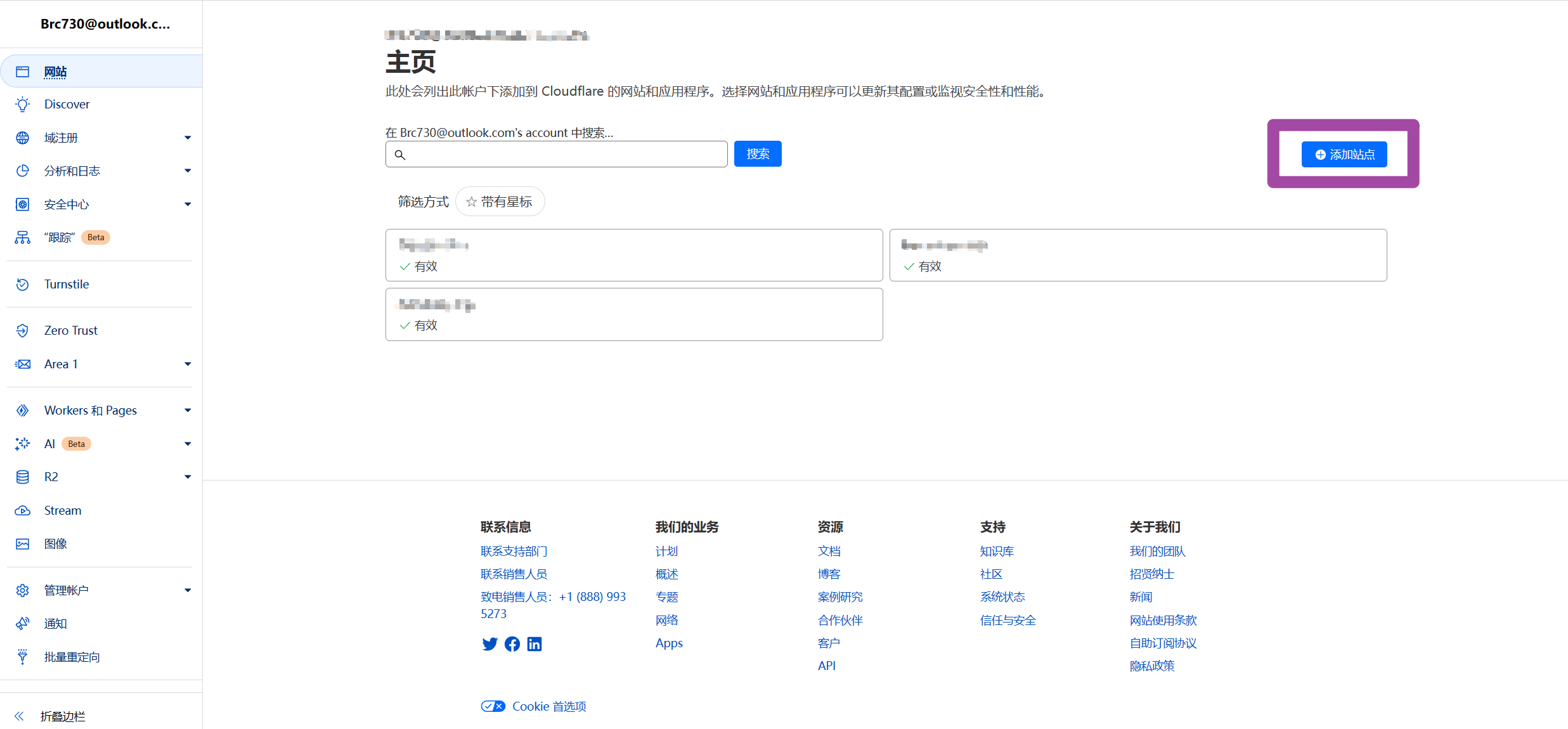
注册一个Cloudflare账号,并登录。然后点击添加站点
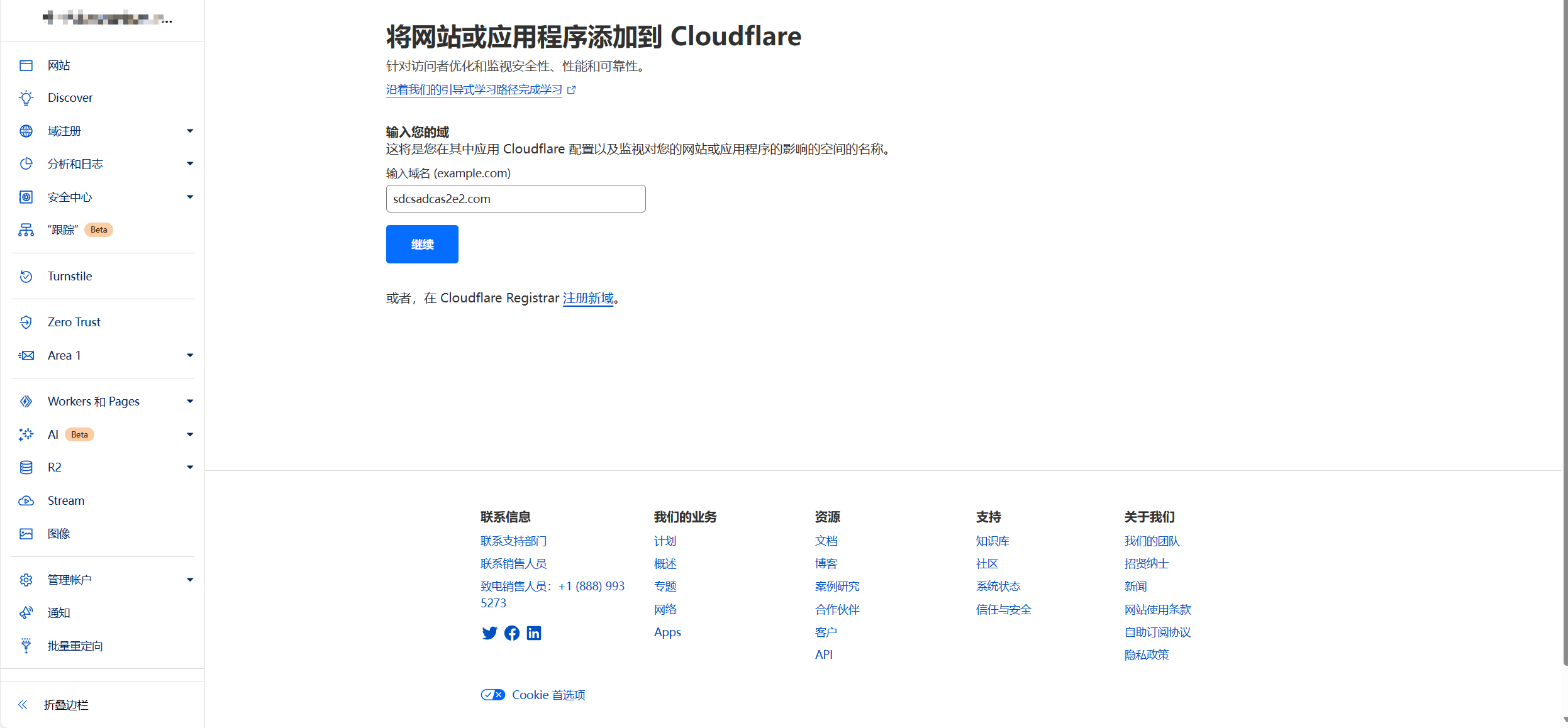
然后输入自己的域名,此处我为做演示,任意输入了一个域名
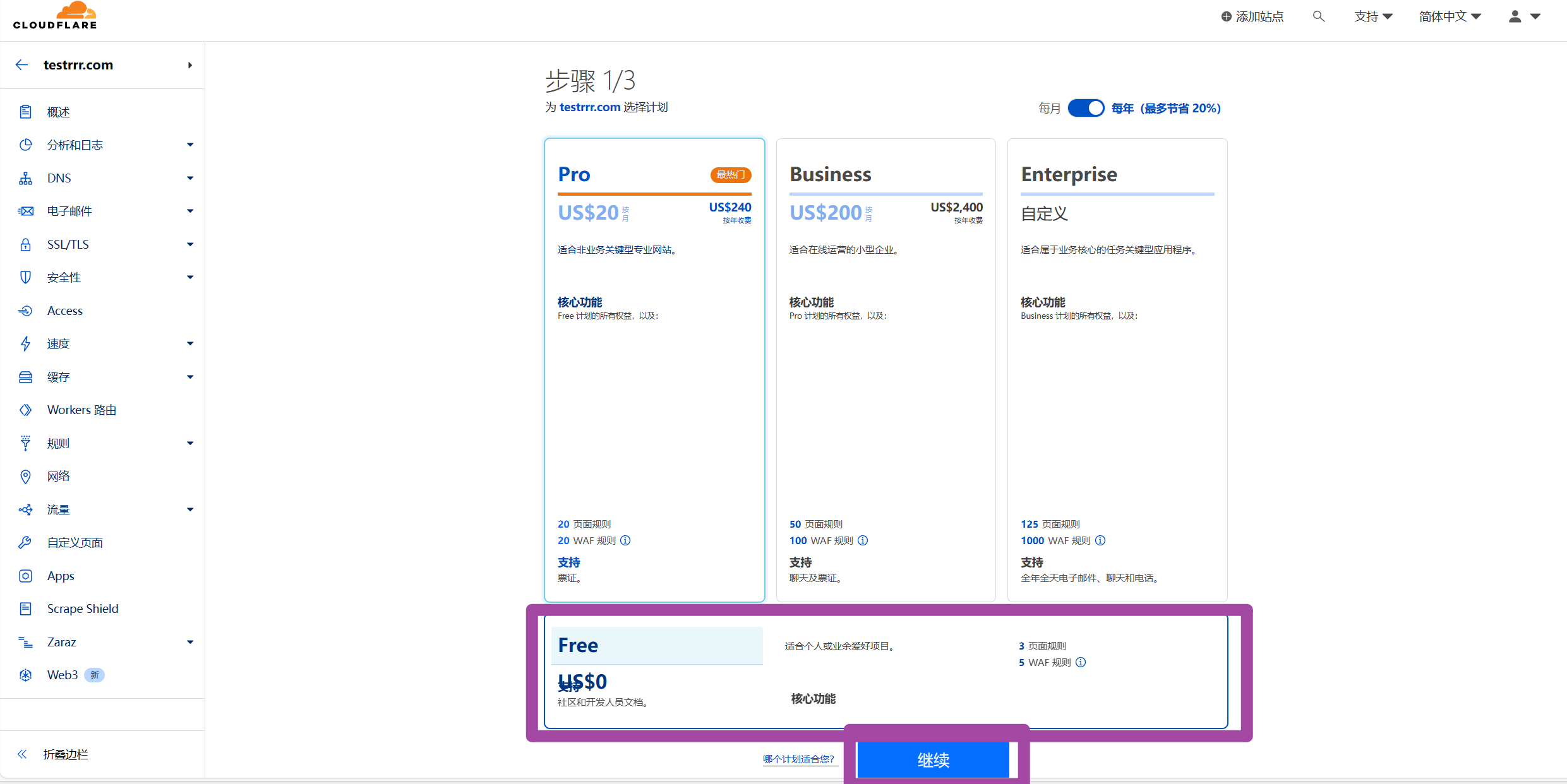
点击继续之后,然后选择Free计划,并且点击继续
添加DNS记录
添加一条DNS记录,如下
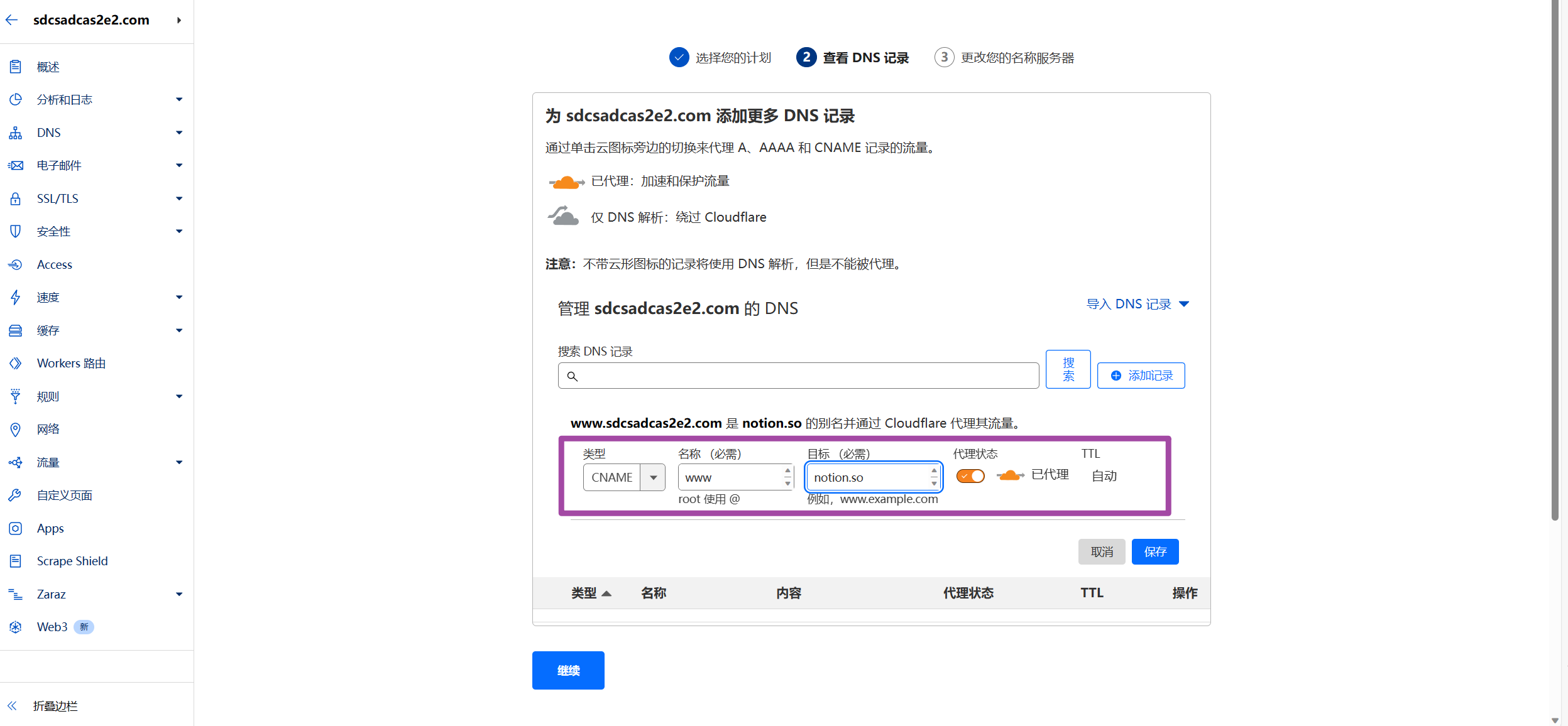
这一步,目标一定是 notion.so,前面的可以自己选择,甚至子域名都可以。
如果是新添加的站点,在上一步结束之后,会出现如下页面
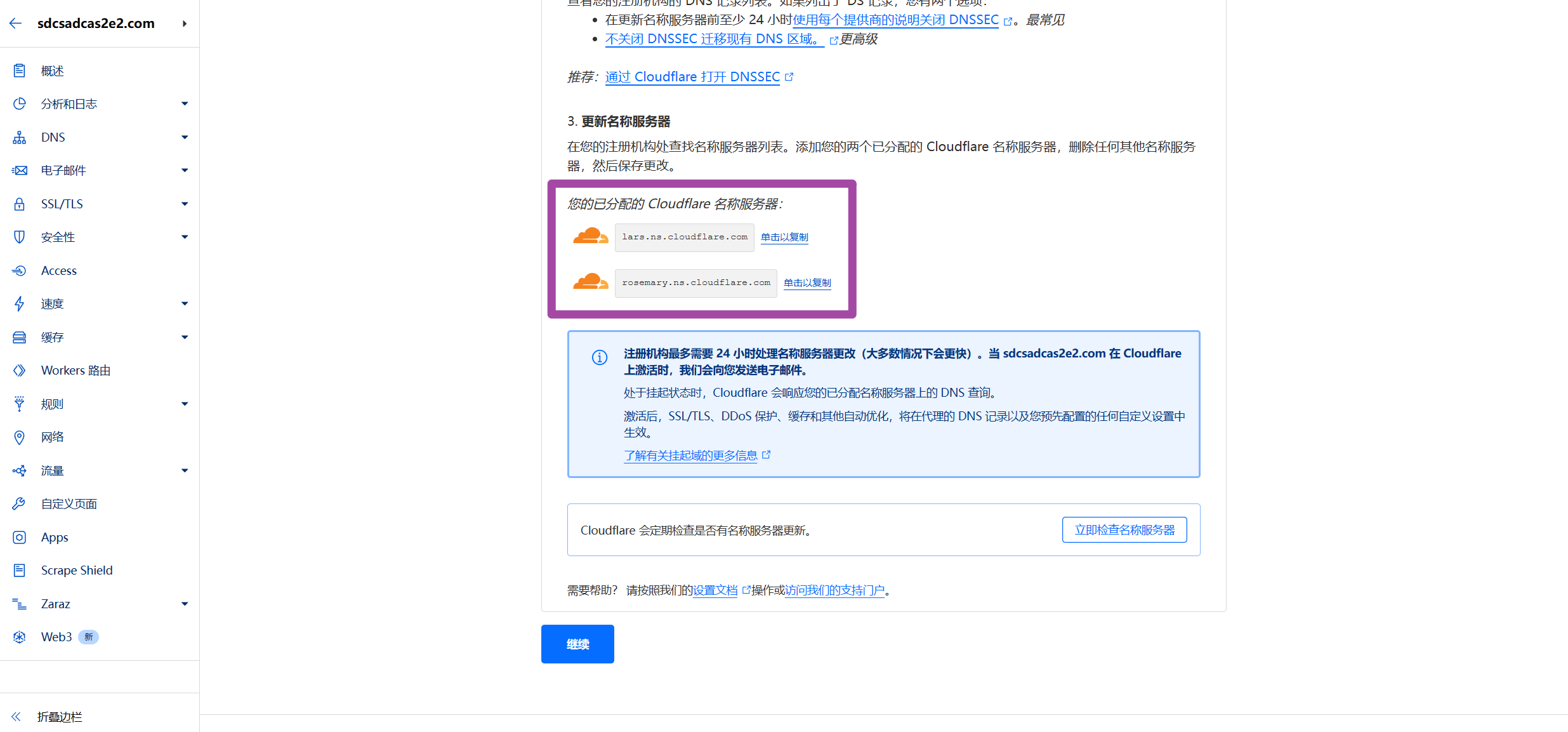
此时去域名购买服务商,将解析服务设置为图中给定的两个地址。不同的域名服务商操作方法不一致,此处不做展示。
准备要分享的Notion页面的Pageid
在Notion分享页面,找到分享链接,然后按照如下位置的字符串就是Pageid。复制下来,后面由用到。
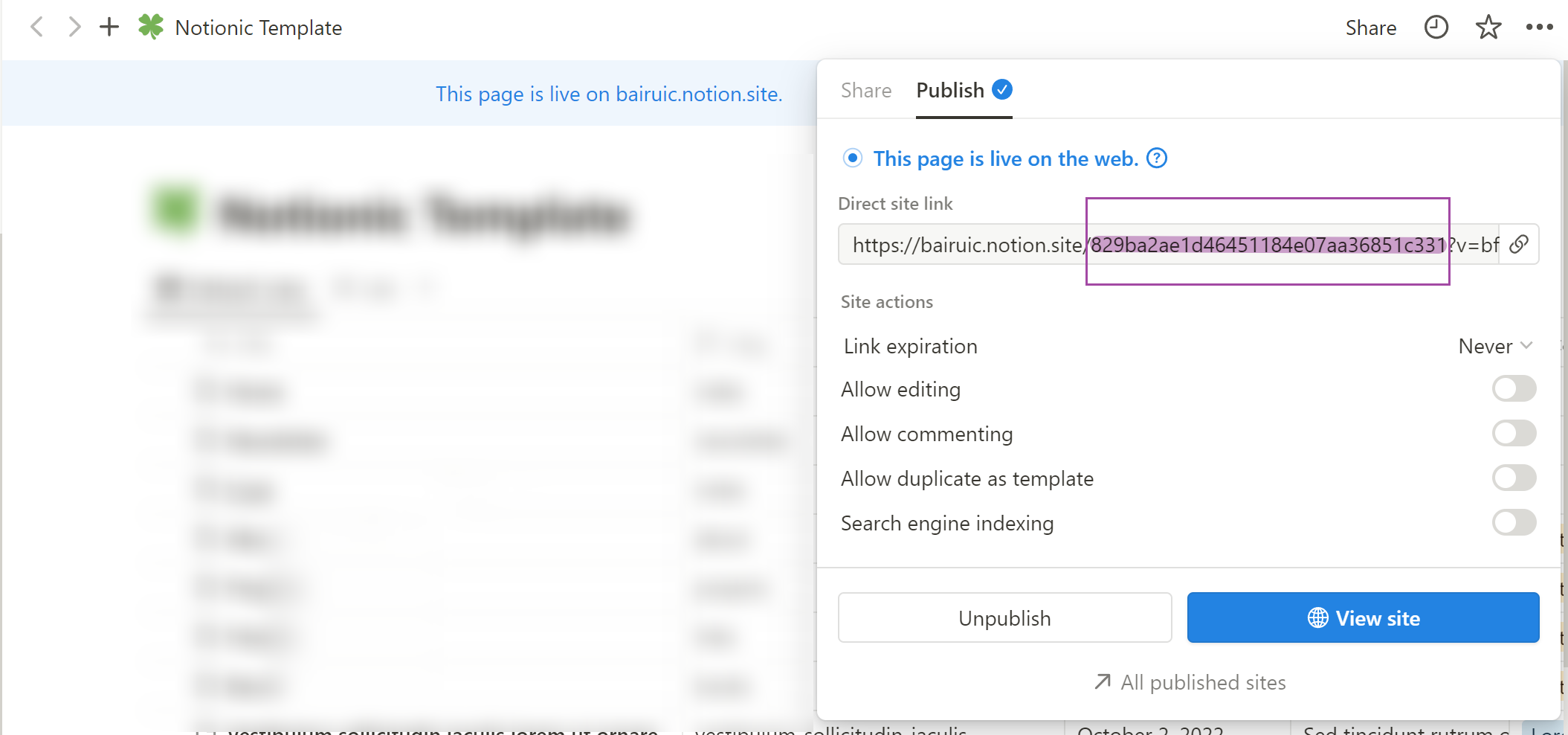
在cloudflare上创建workjs
复制该代码
/* CONFIGURATION STARTS HERE */

  /* Step 1: enter your domain name like fruitionsite.com */
  const MY_DOMAIN = 'jimmyhjh.com';

  /*
   * Step 2: enter your URL slug to page ID mapping
   * The key on the left is the slug (without the slash)
   * The value on the right is the Notion page ID
   */
  const SLUG_TO_PAGE = {
    '': '609afc39414d44938fa055e11663713f',
  };

  /* Step 3: enter your page title and description for SEO purposes */
  const PAGE_TITLE = "Jimmy's Writer Life";
  const PAGE_DESCRIPTION = "It's too hard to be happy all the time.";

  /* Step 4: enter a Google Font name, you can choose from https://fonts.google.com */
  const GOOGLE_FONT = '';

  /* Step 5: enter any custom scripts you'd like */
  const CUSTOM_SCRIPT = ``;

  /* CONFIGURATION ENDS HERE */

  const PAGE_TO_SLUG = {};
  const slugs = [];
  const pages = [];
  Object.keys(SLUG_TO_PAGE).forEach(slug => {
    const page = SLUG_TO_PAGE[slug];
    slugs.push(slug);
    pages.push(page);
    PAGE_TO_SLUG[page] = slug;
  });

  addEventListener('fetch', event => {
    event.respondWith(fetchAndApply(event.request));
  });

  function generateSitemap() {
    let sitemap = '<urlset xmlns="http://www.sitemaps.org/schemas/sitemap/0.9">';
    slugs.forEach(
      (slug) =>
        (sitemap +=
          '<url><loc>https://' + MY_DOMAIN + '/' + slug + '</loc></url>')
    );
    sitemap += '</urlset>';
    return sitemap;
  }

  const corsHeaders = {
    'Access-Control-Allow-Origin': '*',
    'Access-Control-Allow-Methods': 'GET, HEAD, POST, PUT, OPTIONS',
    'Access-Control-Allow-Headers': 'Content-Type',
  };

  function handleOptions(request) {
    if (request.headers.get('Origin') !== null &&
      request.headers.get('Access-Control-Request-Method') !== null &&
      request.headers.get('Access-Control-Request-Headers') !== null) {
      // Handle CORS pre-flight request.
      return new Response(null, {
        headers: corsHeaders
      });
    } else {
      // Handle standard OPTIONS request.
      return new Response(null, {
        headers: {
          'Allow': 'GET, HEAD, POST, PUT, OPTIONS',
        }
      });
    }
  }

  async function fetchAndApply(request) {
    if (request.method === 'OPTIONS') {
      return handleOptions(request);
    }
    let url = new URL(request.url);
    url.hostname = 'www.notion.so';
    if (url.pathname === '/robots.txt') {
      return new Response('Sitemap: https://' + MY_DOMAIN + '/sitemap.xml');
    }
    if (url.pathname === '/sitemap.xml') {
      let response = new Response(generateSitemap());
      response.headers.set('content-type', 'application/xml');
      return response;
    }
    let response;
    if (url.pathname.startsWith('/app') && url.pathname.endsWith('js')) {
      response = await fetch(url.toString());
      let body = await response.text();
      response = new Response(body.replace(/www.notion.so/g, MY_DOMAIN).replace(/notion.so/g, MY_DOMAIN), response);
      response.headers.set('Content-Type', 'application/x-javascript');
      return response;
    } else if ((url.pathname.startsWith('/api'))) {
      // Forward API
      response = await fetch(url.toString(), {
        body: url.pathname.startsWith('/api/v3/getPublicPageData') ? null : request.body,
        headers: {
          'content-type': 'application/json;charset=UTF-8',
          'user-agent': 'Mozilla/5.0 (Macintosh; Intel Mac OS X 10_12_6) AppleWebKit/537.36 (KHTML, like Gecko) Chrome/80.0.3987.163 Safari/537.36'
        },
        method: 'POST',
      });
      response = new Response(response.body, response);
      response.headers.set('Access-Control-Allow-Origin', '*');
      return response;
    } else if (slugs.indexOf(url.pathname.slice(1)) > -1) {
      const pageId = SLUG_TO_PAGE[url.pathname.slice(1)];
      return Response.redirect('https://' + MY_DOMAIN + '/' + pageId, 301);
    } else {
      response = await fetch(url.toString(), {
        body: request.body,
        headers: request.headers,
        method: request.method,
      });
      response = new Response(response.body, response);
      response.headers.delete('Content-Security-Policy');
      response.headers.delete('X-Content-Security-Policy');
    }

    return appendJavascript(response, SLUG_TO_PAGE);
  }

  class MetaRewriter {
    element(element) {
      if (PAGE_TITLE !== '') {
        if (element.getAttribute('property') === 'og:title'
          || element.getAttribute('name') === 'twitter:title') {
          element.setAttribute('content', PAGE_TITLE);
        }
        if (element.tagName === 'title') {
          element.setInnerContent(PAGE_TITLE);
        }
      }
      if (PAGE_DESCRIPTION !== '') {
        if (element.getAttribute('name') === 'description'
          || element.getAttribute('property') === 'og:description'
          || element.getAttribute('name') === 'twitter:description') {
          element.setAttribute('content', PAGE_DESCRIPTION);
        }
      }
      if (element.getAttribute('property') === 'og:url'
        || element.getAttribute('name') === 'twitter:url') {
        element.setAttribute('content', MY_DOMAIN);
      }
      if (element.getAttribute('name') === 'apple-itunes-app') {
        element.remove();
      }
    }
  }

  class HeadRewriter {
    element(element) {
      if (GOOGLE_FONT !== '') {
        element.append(`<link href="https://fonts.googleapis.com/css?family=${GOOGLE_FONT.replace(' ', '+')}:Regular,Bold,Italic&display=swap" rel="stylesheet">
        <style>* { font-family: "${GOOGLE_FONT}" !important; }</style>`, {
          html: true
        });
      }
      element.append(`<style>
      div.notion-topbar > div > div:nth-child(3) { display: none !important; }
      div.notion-topbar > div > div:nth-child(4) { display: none !important; }
      div.notion-topbar > div > div:nth-child(5) { display: none !important; }
      div.notion-topbar > div > div:nth-child(6) { display: none !important; }
      div.notion-topbar-mobile > div:nth-child(3) { display: none !important; }
      div.notion-topbar-mobile > div:nth-child(4) { display: none !important; }
      div.notion-topbar > div > div:nth-child(1n).toggle-mode { display: block !important; }
      div.notion-topbar-mobile > div:nth-child(1n).toggle-mode { display: block !important; }
      </style>`, {
        html: true
      })
    }
  }

  class BodyRewriter {
    constructor(SLUG_TO_PAGE) {
      this.SLUG_TO_PAGE = SLUG_TO_PAGE;
    }
    element(element) {
      element.append(`<div style="display:none">Powered by <a href="http://fruitionsite.com">Fruition</a></div>
      <script>
      window.CONFIG.domainBaseUrl = 'https://${MY_DOMAIN}';
      const SLUG_TO_PAGE = ${JSON.stringify(this.SLUG_TO_PAGE)};
      const PAGE_TO_SLUG = {};
      const slugs = [];
      const pages = [];
      const el = document.createElement('div');
      let redirected = false;
      Object.keys(SLUG_TO_PAGE).forEach(slug => {
        const page = SLUG_TO_PAGE[slug];
        slugs.push(slug);
        pages.push(page);
        PAGE_TO_SLUG[page] = slug;
      });
      function getPage() {
        return location.pathname.slice(-32);
      }
      function getSlug() {
        return location.pathname.slice(1);
      }
      function updateSlug() {
        const slug = PAGE_TO_SLUG[getPage()];
        if (slug != null) {
          history.replaceState(history.state, '', '/' + slug);
        }
      }
      function onDark() {
        el.innerHTML = '<div title="Change to Light Mode" style="margin-left: auto; margin-right: 14px; min-width: 0px;"><div role="button" tabindex="0" style="user-select: none; transition: background 120ms ease-in 0s; cursor: pointer; border-radius: 44px;"><div style="display: flex; flex-shrink: 0; height: 14px; width: 26px; border-radius: 44px; padding: 2px; box-sizing: content-box; background: rgb(46, 170, 220); transition: background 200ms ease 0s, box-shadow 200ms ease 0s;"><div style="width: 14px; height: 14px; border-radius: 44px; background: white; transition: transform 200ms ease-out 0s, background 200ms ease-out 0s; transform: translateX(12px) translateY(0px);"></div></div></div></div>';
        document.body.classList.add('dark');
        __console.environment.ThemeStore.setState({ mode: 'dark' });
      };
      function onLight() {
        el.innerHTML = '<div title="Change to Dark Mode" style="margin-left: auto; margin-right: 14px; min-width: 0px;"><div role="button" tabindex="0" style="user-select: none; transition: background 120ms ease-in 0s; cursor: pointer; border-radius: 44px;"><div style="display: flex; flex-shrink: 0; height: 14px; width: 26px; border-radius: 44px; padding: 2px; box-sizing: content-box; background: rgba(135, 131, 120, 0.3); transition: background 200ms ease 0s, box-shadow 200ms ease 0s;"><div style="width: 14px; height: 14px; border-radius: 44px; background: white; transition: transform 200ms ease-out 0s, background 200ms ease-out 0s; transform: translateX(0px) translateY(0px);"></div></div></div></div>';
        document.body.classList.remove('dark');
        __console.environment.ThemeStore.setState({ mode: 'light' });
      }
      function toggle() {
        if (document.body.classList.contains('dark')) {
          onLight();
        } else {
          onDark();
        }
      }
      function addDarkModeButton(device) {
        const nav = device === 'web' ? document.querySelector('.notion-topbar').firstChild : document.querySelector('.notion-topbar-mobile');
        el.className = 'toggle-mode';
        el.addEventListener('click', toggle);
        nav.appendChild(el);
        onLight();
      }
      const observer = new MutationObserver(function() {
        if (redirected) return;
        const nav = document.querySelector('.notion-topbar');
        const mobileNav = document.querySelector('.notion-topbar-mobile');
        if (nav && nav.firstChild && nav.firstChild.firstChild
          || mobileNav && mobileNav.firstChild) {
          redirected = true;
          updateSlug();
          addDarkModeButton(nav ? 'web' : 'mobile');
          const onpopstate = window.onpopstate;
          window.onpopstate = function() {
            if (slugs.includes(getSlug())) {
              const page = SLUG_TO_PAGE[getSlug()];
              if (page) {
                history.replaceState(history.state, 'bypass', '/' + page);
              }
            }
            onpopstate.apply(this, [].slice.call(arguments));
            updateSlug();
          };
        }
      });
      observer.observe(document.querySelector('#notion-app'), {
        childList: true,
        subtree: true,
      });
      const replaceState = window.history.replaceState;
      window.history.replaceState = function(state) {
        if (arguments[1] !== 'bypass' && slugs.includes(getSlug())) return;
        return replaceState.apply(window.history, arguments);
      };
      const pushState = window.history.pushState;
      window.history.pushState = function(state) {
        const dest = new URL(location.protocol + location.host + arguments[2]);
        const id = dest.pathname.slice(-32);
        if (pages.includes(id)) {
          arguments[2] = '/' + PAGE_TO_SLUG[id];
        }
        return pushState.apply(window.history, arguments);
      };
      const open = window.XMLHttpRequest.prototype.open;
      window.XMLHttpRequest.prototype.open = function() {
        arguments[1] = arguments[1].replace('${MY_DOMAIN}', 'www.notion.so');
        return open.apply(this, [].slice.call(arguments));
      };
    </script>${CUSTOM_SCRIPT}`, {
        html: true
      });
    }
  }

  async function appendJavascript(res, SLUG_TO_PAGE) {
    return new HTMLRewriter()
      .on('title', new MetaRewriter())
      .on('meta', new MetaRewriter())
      .on('head', new HeadRewriter())
      .on('body', new BodyRewriter(SLUG_TO_PAGE))
      .transform(res);
  }
打开Cloudflare页面,在左边找到Workers和Pages, 点击之后有如下页面
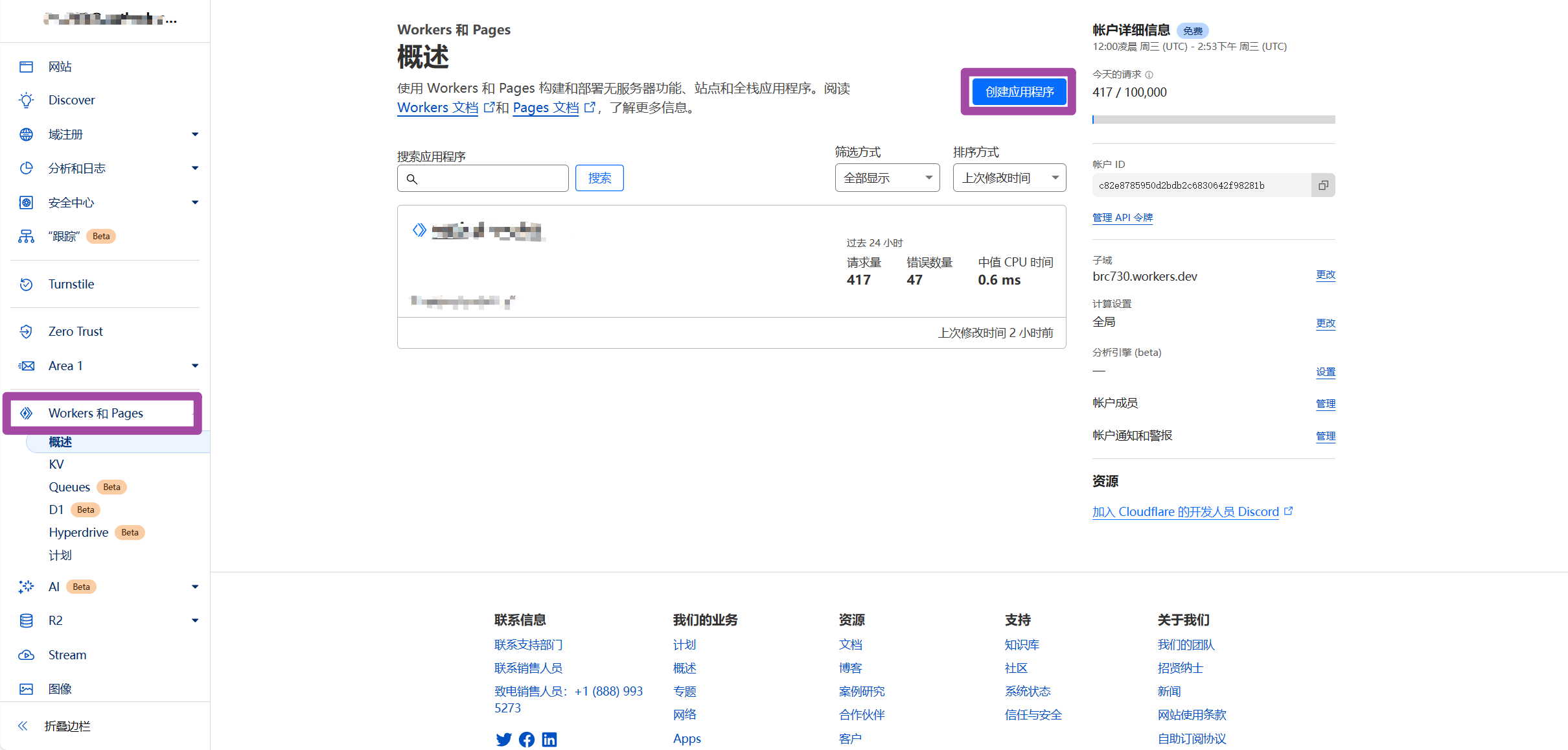
然后点击右上角创建应用程序,之后有如下页面
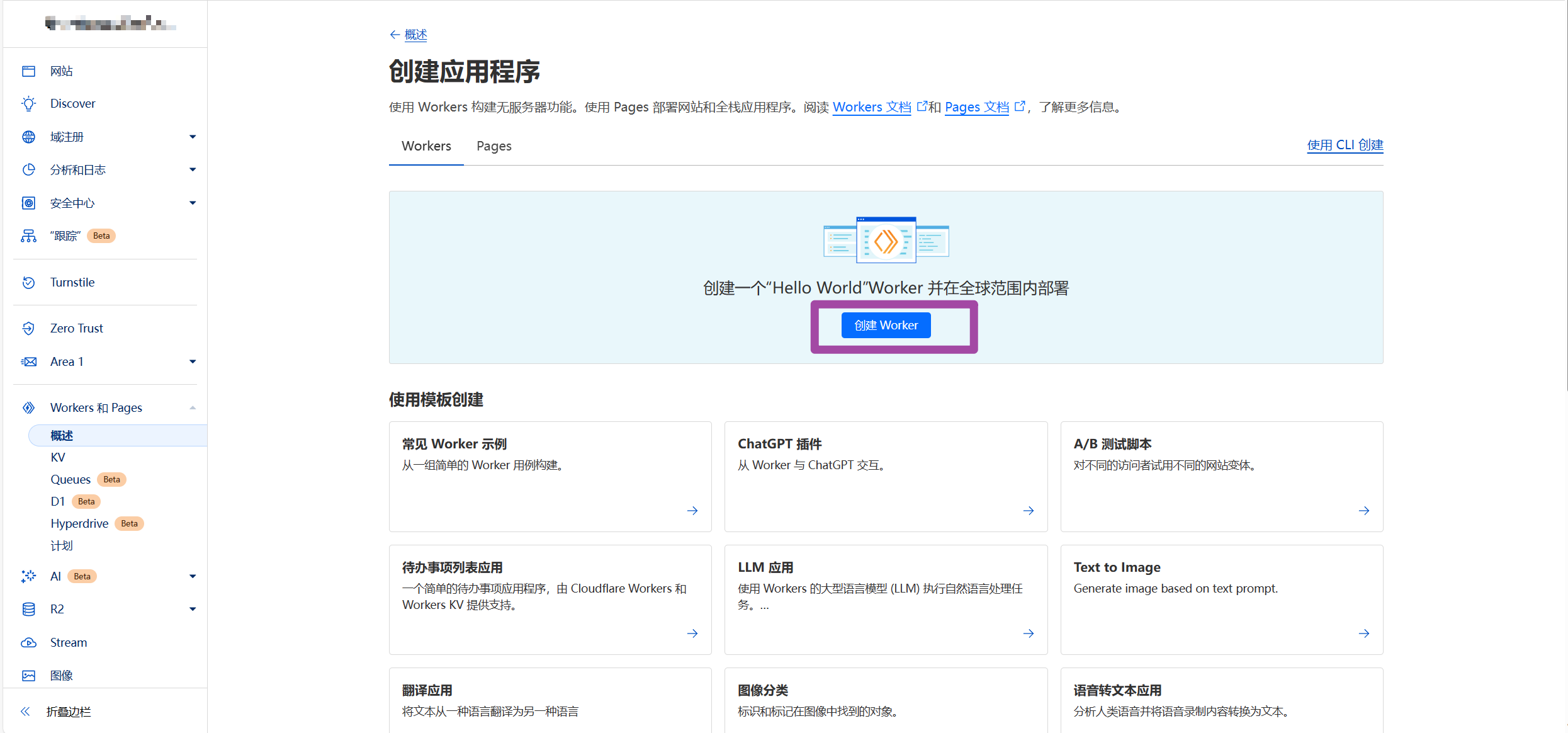
此时,点击创建Worker,有如下页面
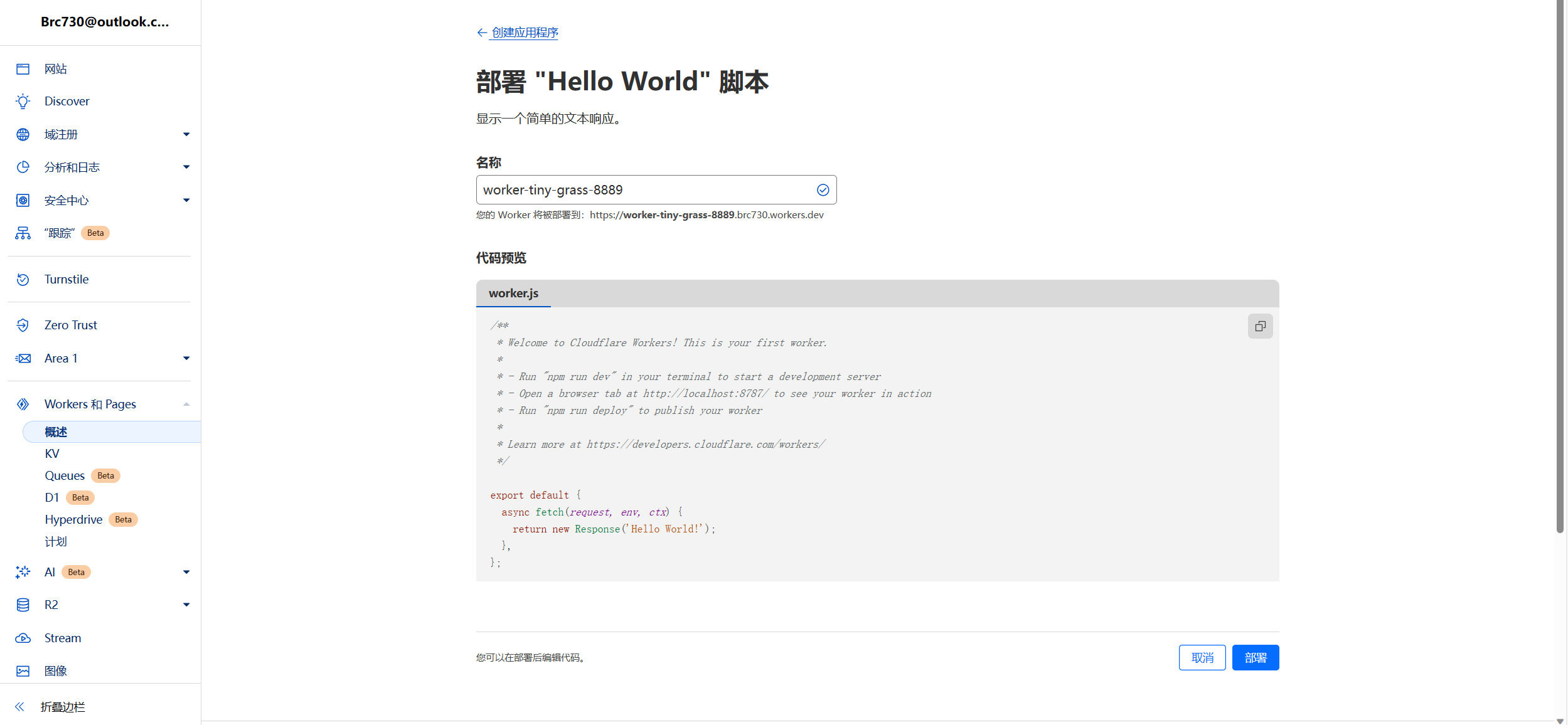
输入名称之后,直接点击部署即可。
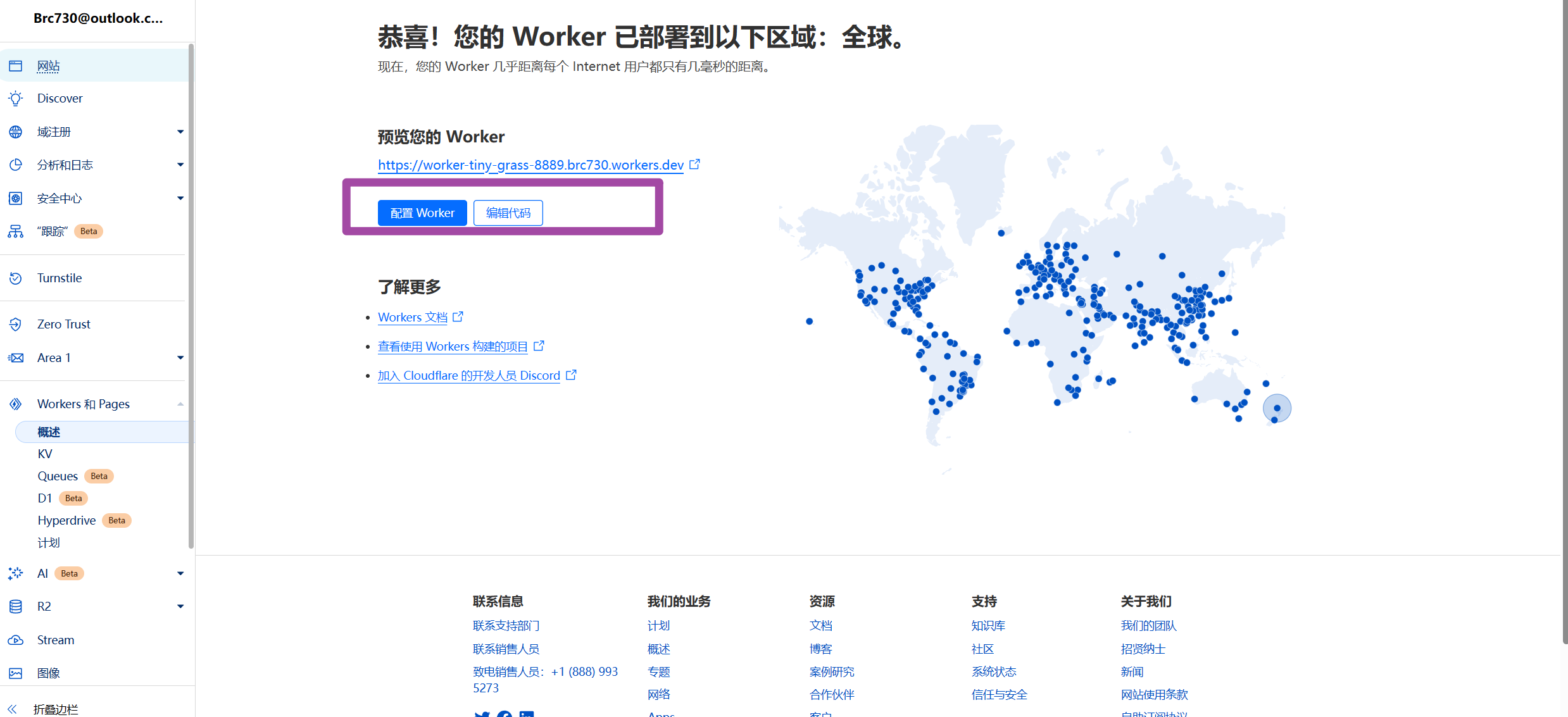
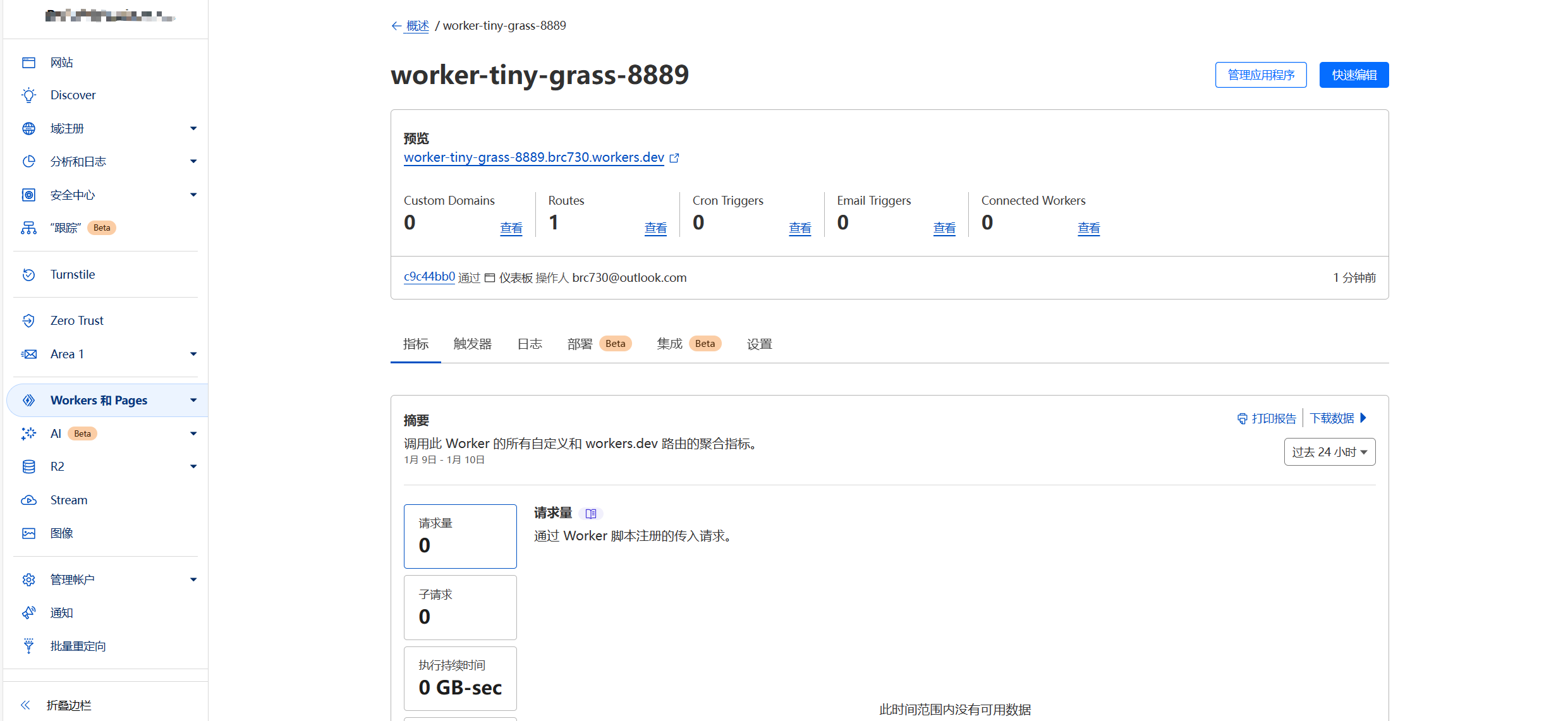
接着,点击配置Worker,在打开的页面(如下)点击快速配置,
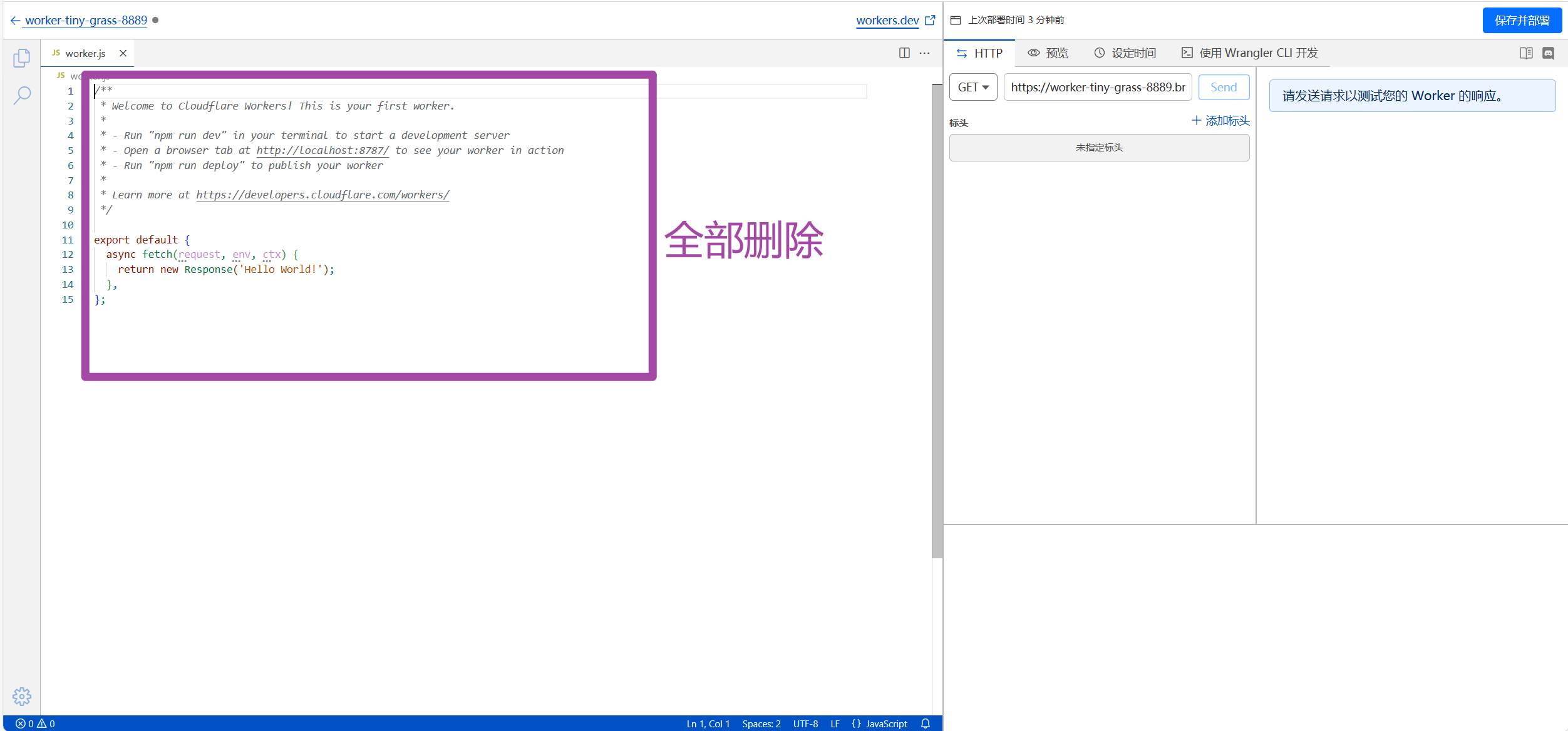
将第一步复制的代码粘贴到左边的编辑文本框。(要把左边文本框原先的代码先删除再粘贴)
粘贴好之后,按照如下修改,域名和pageid是必须修改项目,其余的非必须,可以根据自己的情况来。
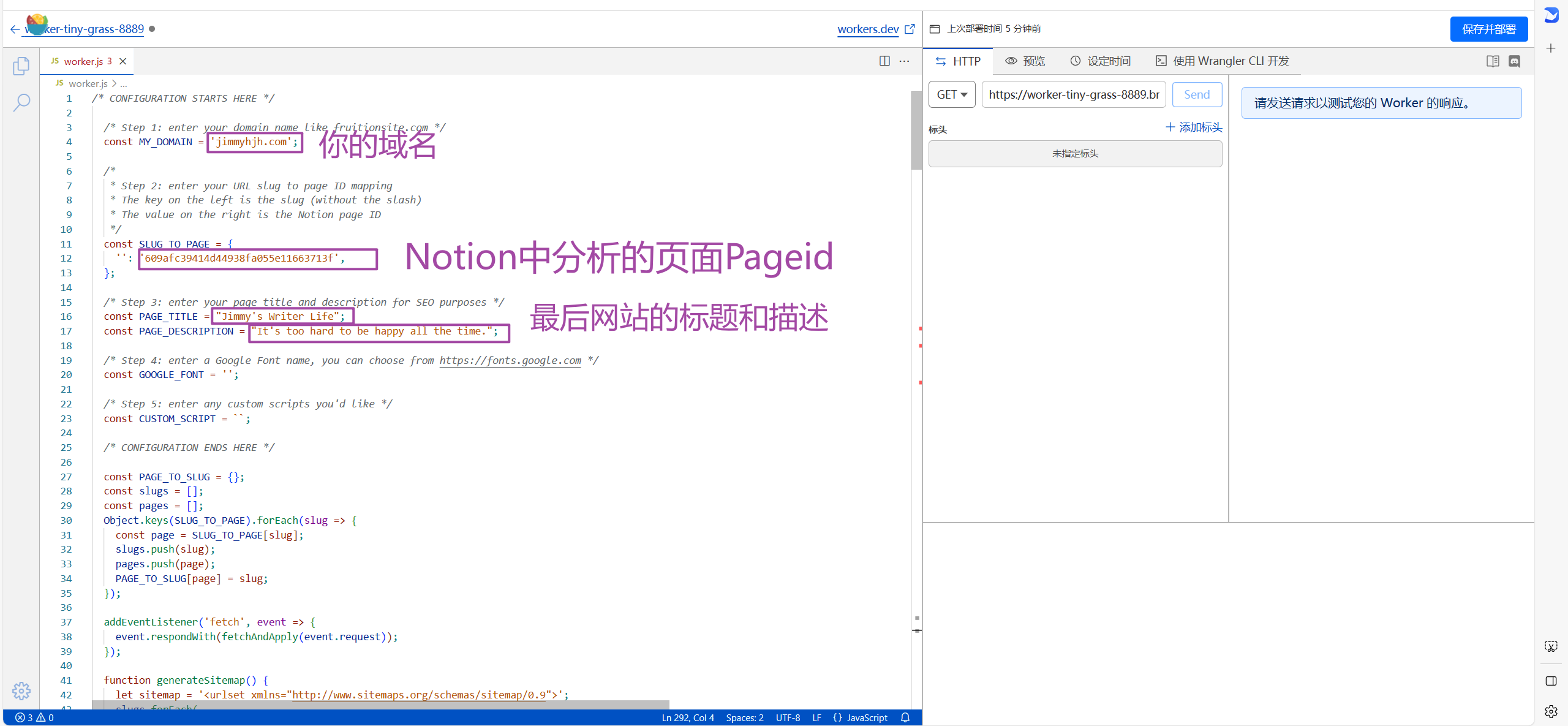
改完之后,直接右上角保存并部署。
给创建的workers添加路由
添加好Workers服务之后,再回到Cloudflare首页,且点击Workers 和 pages, 此时可以看到刚刚部署的Workers,点击之后就由如下页面
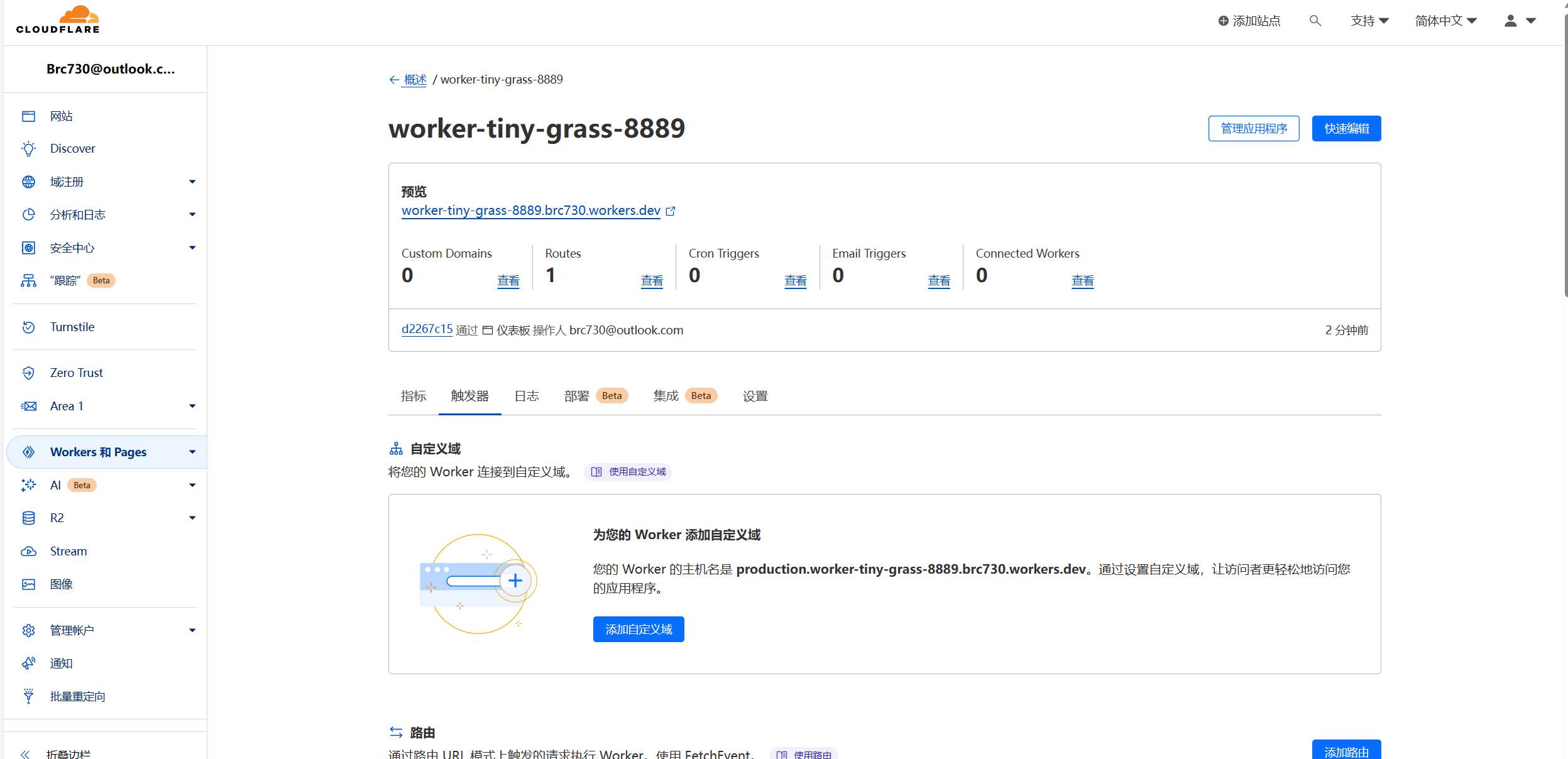
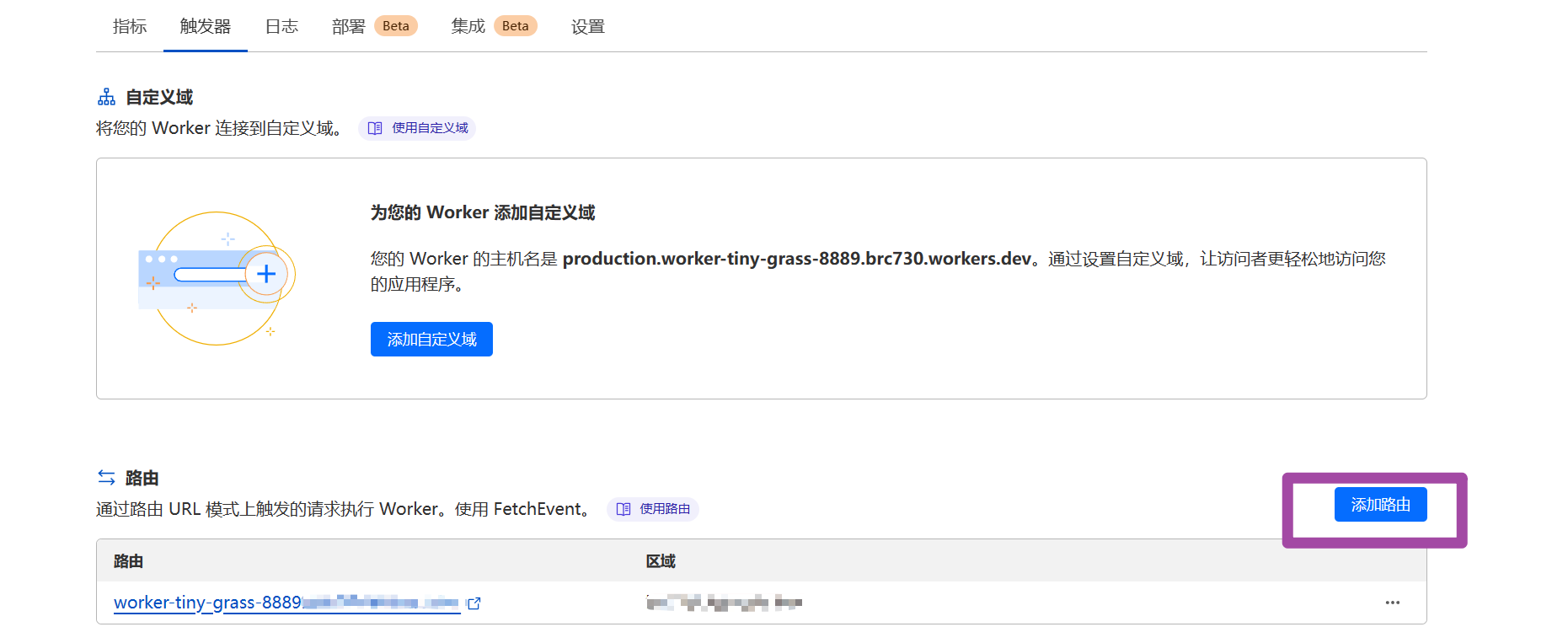
在触发器选项卡,找到添加路由并点击
然后按照提示格式输入你的域名,比如你的域名是 www.myexample.com,那你要输入的就是www.myexample.com/*,然后在区域选择一二级域名(本例是myexample.com)即可。
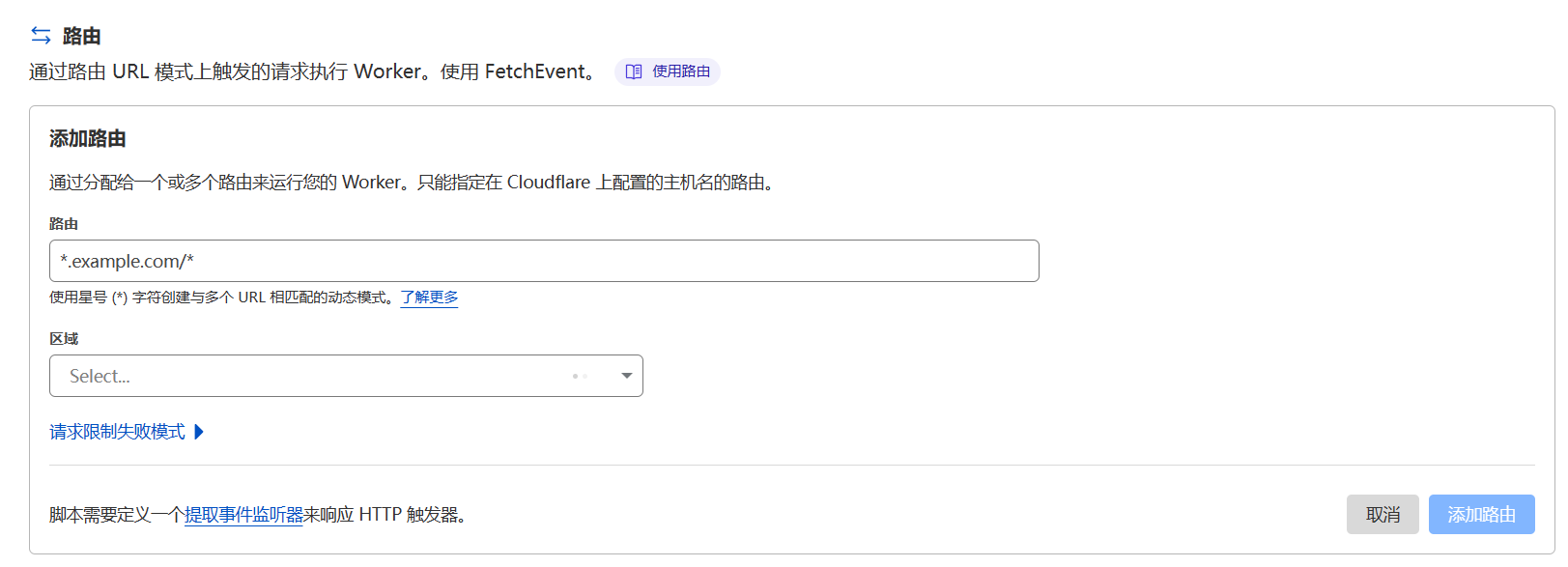
输入完成之后,点击右下角添加路由即可。
之后,需要稍等一会。然后浏览器输入域名就可以打开分享域名了。
参考
  const MY_DOMAIN = 'dominikkk.cn';
  const SLUG_TO_PAGE = {
    '': 'c73dc0f0e5224a57b3d17eff45171431',
  };
  const PAGE_TITLE = 'Dominik’s Blog';
  const PAGE_DESCRIPTION = '';
  const GOOGLE_FONT = '';

  const CUSTOM_SCRIPT = ``;

  const PAGE_TO_SLUG = {};
  const slugs = [];
  const pages = [];
  Object.keys(SLUG_TO_PAGE).forEach(slug => {
    const page = SLUG_TO_PAGE[slug];
    slugs.push(slug);
    pages.push(page);
    PAGE_TO_SLUG[page] = slug;
  });

  addEventListener('fetch', event => {
    event.respondWith(fetchAndApply(event.request));
  });

  function generateSitemap() {
    let sitemap = '<urlset xmlns="http://www.sitemaps.org/schemas/sitemap/0.9">';
    slugs.forEach(
      (slug) =>
        (sitemap +=
          '<url><loc>https://' + MY_DOMAIN + '/' + slug + '</loc></url>')
    );
    sitemap += '</urlset>';
    return sitemap;
  }

  const corsHeaders = {
    'Access-Control-Allow-Origin': '*',
    'Access-Control-Allow-Methods': 'GET, HEAD, POST, PUT, OPTIONS',
    'Access-Control-Allow-Headers': 'Content-Type',
  };

  function handleOptions(request) {
    if (request.headers.get('Origin') !== null &&
      request.headers.get('Access-Control-Request-Method') !== null &&
      request.headers.get('Access-Control-Request-Headers') !== null) {
      // Handle CORS pre-flight request.
      return new Response(null, {
        headers: corsHeaders
      });
    } else {
      // Handle standard OPTIONS request.
      return new Response(null, {
        headers: {
          'Allow': 'GET, HEAD, POST, PUT, OPTIONS',
        }
      });
    }
  }

  async function fetchAndApply(request) {
    if (request.method === 'OPTIONS') {
      return handleOptions(request);
    }
    let url = new URL(request.url);
    url.hostname = 'www.notion.so';
    if (url.pathname === '/robots.txt') {
      return new Response('Sitemap: https://' + MY_DOMAIN + '/sitemap.xml');
    }
    if (url.pathname === '/sitemap.xml') {
      let response = new Response(generateSitemap());
      response.headers.set('content-type', 'application/xml');
      return response;
    }
    let response;
    if (url.pathname.startsWith('/app') && url.pathname.endsWith('js')) {
      response = await fetch(url.toString());
      let body = await response.text();
      response = new Response(body.replace(/www.notion.so/g, MY_DOMAIN).replace(/notion.so/g, MY_DOMAIN), response);
      response.headers.set('Content-Type', 'application/x-javascript');
      return response;
    } else if ((url.pathname.startsWith('/api'))) {
      // Forward API
      response = await fetch(url.toString(), {
        body: url.pathname.startsWith('/api/v3/getPublicPageData') ? null : request.body,
        headers: {
          'content-type': 'application/json;charset=UTF-8',
          'user-agent': 'Mozilla/5.0 (Macintosh; Intel Mac OS X 10_12_6) AppleWebKit/537.36 (KHTML, like Gecko) Chrome/80.0.3987.163 Safari/537.36'
        },
        method: 'POST',
      });
      response = new Response(response.body, response);
      response.headers.set('Access-Control-Allow-Origin', '*');
      return response;
    } else if (slugs.indexOf(url.pathname.slice(1)) > -1) {
      const pageId = SLUG_TO_PAGE[url.pathname.slice(1)];
      return Response.redirect('https://' + MY_DOMAIN + '/' + pageId, 301);
    } else {
      response = await fetch(url.toString(), {
        body: request.body,
        headers: request.headers,
        method: request.method,
      });
      response = new Response(response.body, response);
      response.headers.delete('Content-Security-Policy');
      response.headers.delete('X-Content-Security-Policy');
    }

    return appendJavascript(response, SLUG_TO_PAGE);
  }

  class MetaRewriter {
    element(element) {
      if (PAGE_TITLE !== '') {
        if (element.getAttribute('property') === 'og:title'
          || element.getAttribute('name') === 'twitter:title') {
          element.setAttribute('content', PAGE_TITLE);
        }
        if (element.tagName === 'title') {
          element.setInnerContent(PAGE_TITLE);
        }
      }
      if (PAGE_DESCRIPTION !== '') {
        if (element.getAttribute('name') === 'description'
          || element.getAttribute('property') === 'og:description'
          || element.getAttribute('name') === 'twitter:description') {
          element.setAttribute('content', PAGE_DESCRIPTION);
        }
      }
      if (element.getAttribute('property') === 'og:url'
        || element.getAttribute('name') === 'twitter:url') {
        element.setAttribute('content', MY_DOMAIN);
      }
      if (element.getAttribute('name') === 'apple-itunes-app') {
        element.remove();
      }
    }
  }

  class HeadRewriter {
    element(element) {
      if (GOOGLE_FONT !== '') {
        element.append(`<link href="https://fonts.googleapis.com/css?family=${GOOGLE_FONT.replace(' ', '+')}:Regular,Bold,Italic&display=swap" rel="stylesheet">
        <style>* { font-family: "${GOOGLE_FONT}" !important; }</style>`, {
          html: true
        });
      }
      element.append(`<style>
      div.notion-topbar > div > div:nth-child(3) { display: none !important; }
      div.notion-topbar > div > div:nth-child(4) { display: none !important; }
      div.notion-topbar > div > div:nth-child(5) { display: none !important; }
      div.notion-topbar > div > div:nth-child(6) { display: none !important; }
      div.notion-topbar-mobile > div:nth-child(3) { display: none !important; }
      div.notion-topbar-mobile > div:nth-child(4) { display: none !important; }
      div.notion-topbar > div > div:nth-child(1n).toggle-mode { display: block !important; }
      div.notion-topbar-mobile > div:nth-child(1n).toggle-mode { display: block !important; }
      </style>`, {
        html: true
      })
    }
  }

  class BodyRewriter {
    constructor(SLUG_TO_PAGE) {
      this.SLUG_TO_PAGE = SLUG_TO_PAGE;
    }
    element(element) {
      element.append(`<div style="display:none">Powered by <a href="http://fruitionsite.com">Fruition</a></div>
      <script>
      window.CONFIG.domainBaseUrl = 'https://${MY_DOMAIN}';
      const SLUG_TO_PAGE = ${JSON.stringify(this.SLUG_TO_PAGE)};
      const PAGE_TO_SLUG = {};
      const slugs = [];
      const pages = [];
      const el = document.createElement('div');
      let redirected = false;
      Object.keys(SLUG_TO_PAGE).forEach(slug => {
        const page = SLUG_TO_PAGE[slug];
        slugs.push(slug);
        pages.push(page);
        PAGE_TO_SLUG[page] = slug;
      });
      function getPage() {
        return location.pathname.slice(-32);
      }
      function getSlug() {
        return location.pathname.slice(1);
      }
      function updateSlug() {
        const slug = PAGE_TO_SLUG[getPage()];
        if (slug != null) {
          history.replaceState(history.state, '', '/' + slug);
        }
      }
      function onDark() {
        el.innerHTML = '<div title="Change to Light Mode" style="margin-left: auto; margin-right: 14px; min-width: 0px;"><div role="button" tabindex="0" style="user-select: none; transition: background 120ms ease-in 0s; cursor: pointer; border-radius: 44px;"><div style="display: flex; flex-shrink: 0; height: 14px; width: 26px; border-radius: 44px; padding: 2px; box-sizing: content-box; background: rgb(46, 170, 220); transition: background 200ms ease 0s, box-shadow 200ms ease 0s;"><div style="width: 14px; height: 14px; border-radius: 44px; background: white; transition: transform 200ms ease-out 0s, background 200ms ease-out 0s; transform: translateX(12px) translateY(0px);"></div></div></div></div>';
        document.body.classList.add('dark');
        __console.environment.ThemeStore.setState({ mode: 'dark' });
      };
      function onLight() {
        el.innerHTML = '<div title="Change to Dark Mode" style="margin-left: auto; margin-right: 14px; min-width: 0px;"><div role="button" tabindex="0" style="user-select: none; transition: background 120ms ease-in 0s; cursor: pointer; border-radius: 44px;"><div style="display: flex; flex-shrink: 0; height: 14px; width: 26px; border-radius: 44px; padding: 2px; box-sizing: content-box; background: rgba(135, 131, 120, 0.3); transition: background 200ms ease 0s, box-shadow 200ms ease 0s;"><div style="width: 14px; height: 14px; border-radius: 44px; background: white; transition: transform 200ms ease-out 0s, background 200ms ease-out 0s; transform: translateX(0px) translateY(0px);"></div></div></div></div>';
        document.body.classList.remove('dark');
        __console.environment.ThemeStore.setState({ mode: 'light' });
      }
      function toggle() {
        if (document.body.classList.contains('dark')) {
          onLight();
        } else {
          onDark();
        }
      }
      function addDarkModeButton(device) {
        const nav = device === 'web' ? document.querySelector('.notion-topbar').firstChild : document.querySelector('.notion-topbar-mobile');
        el.className = 'toggle-mode';
        el.addEventListener('click', toggle);
        nav.appendChild(el);
        onLight();
      }
      const observer = new MutationObserver(function() {
        if (redirected) return;
        const nav = document.querySelector('.notion-topbar');
        const mobileNav = document.querySelector('.notion-topbar-mobile');
        if (nav && nav.firstChild && nav.firstChild.firstChild
          || mobileNav && mobileNav.firstChild) {
          redirected = true;
          updateSlug();
          addDarkModeButton(nav ? 'web' : 'mobile');
          const onpopstate = window.onpopstate;
          window.onpopstate = function() {
            if (slugs.includes(getSlug())) {
              const page = SLUG_TO_PAGE[getSlug()];
              if (page) {
                history.replaceState(history.state, 'bypass', '/' + page);
              }
            }
            onpopstate.apply(this, [].slice.call(arguments));
            updateSlug();
          };
        }
      });
      observer.observe(document.querySelector('#notion-app'), {
        childList: true,
        subtree: true,
      });
      const replaceState = window.history.replaceState;
      window.history.replaceState = function(state) {
        if (arguments[1] !== 'bypass' && slugs.includes(getSlug())) return;
        return replaceState.apply(window.history, arguments);
      };
      const pushState = window.history.pushState;
      window.history.pushState = function(state) {
        const dest = new URL(location.protocol + location.host + arguments[2]);
        const id = dest.pathname.slice(-32);
        if (pages.includes(id)) {
          arguments[2] = '/' + PAGE_TO_SLUG[id];
        }
        return pushState.apply(window.history, arguments);
      };
      const open = window.XMLHttpRequest.prototype.open;
      window.XMLHttpRequest.prototype.open = function() {
        arguments[1] = arguments[1].replace('${MY_DOMAIN}', 'www.notion.so');
        return open.apply(this, [].slice.call(arguments));
      };
    </script>${CUSTOM_SCRIPT}`, {
        html: true
      });
    }
  }

  async function appendJavascript(res, SLUG_TO_PAGE) {
    return new HTMLRewriter()
      .on('title', new MetaRewriter())
      .on('meta', new MetaRewriter())
      .on('head', new HeadRewriter())
      .on('body', new BodyRewriter(SLUG_TO_PAGE))
      .transform(res);
  }